01
Install
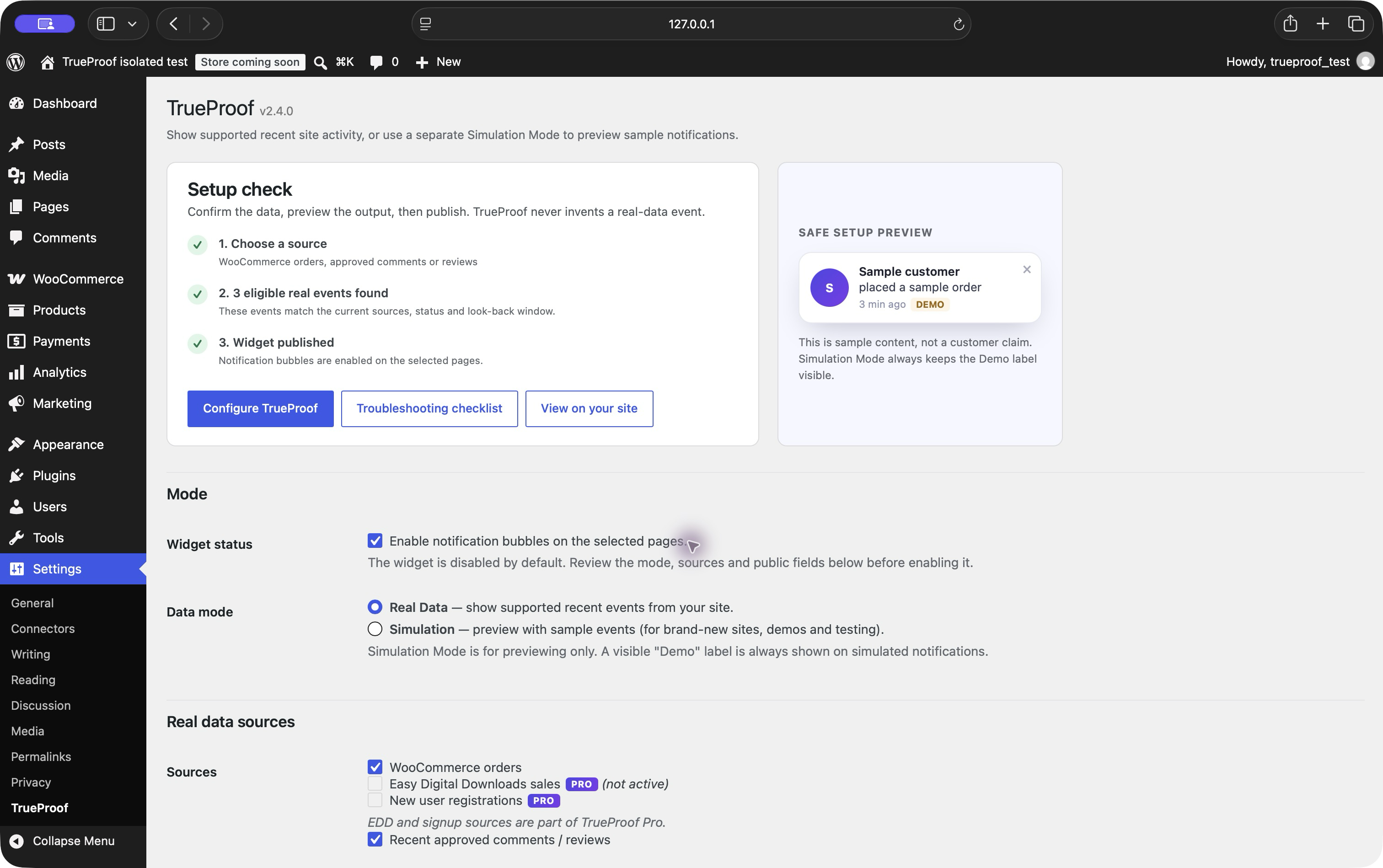
Add TrueProof from WordPress.org, activate it, and open Settings → TrueProof.
Turn real orders and approved reviews into recent-activity notifications. Start with anonymous names, keep source data in WordPress, and install the free plugin without an account.
Free download · No account or card required · WordPress 6.0+ · PHP 8.0+
Follow the WooCommerce setup checklist · See when Pro is worth adding
 Safe demo preview
No separate dashboard is required for the free plugin.
Add TrueProof from WordPress.org, activate it, and open Settings → TrueProof.
Select recent WooCommerce orders, approved reviews or comments already stored in WordPress.
Choose the position and timing, then show the notification on the front page or across the site.
See the setup sequence, then verify it on your own store.
Free covers the core WooCommerce use case. Pro adds EDD, registrations and selected-context rules.
Recent orders with processing or completed status.
Recently approved reviews and comments. Pingbacks and trackbacks are excluded.
Recent completed Easy Digital Downloads sales.
Recent new-user registrations from your WordPress site.
Display controls: bottom-left or bottom-right placement, accent colour, start delay, display time, gap, look-back window and maximum number of events.
Display rules: Free supports site-wide or front-page display. Pro limits notifications by supported contexts: front/posts page, blog posts, pages, WooCommerce products and archive views.
Displays recent events from the sources enabled on your WordPress site.
For the live siteGenerates explicitly worded sample events so you can preview the widget before real activity exists. A visible “Demo” label is always shown on simulated notifications.
Setup previewTrueProof reads supported events already stored on your WordPress site. During normal use without licence activation, the plugin's own code makes no third-party requests.
Entering a licence key, periodic validation while it is active, or deactivation sends a built-in request containing the licence key, home URL and requested action to wptrueproof.com. The licensing service also receives standard network metadata. Notification-source records are not included in that request.
Bring EDD purchases or WordPress signups into your same-site activity feed, choose supported page types, and use one licence across client sites.
Use completed Easy Digital Downloads orders as the activity source. TrueProof shows a generic purchase action, not the download title or order value.
Show recent WordPress registrations. This is a signup event, not proof of a paid membership or a verified customer; review spam registrations before publishing.
Use selected-context rules to show notifications on WooCommerce product pages rather than across every page. Rules are page-type based, not URL, visitor or per-product event matching.
Pro covers up to five active site URLs; Agency raises the allowance to 999. Configure and verify each site independently — there is no hosted fleet dashboard.
| Feature | Free | Pro |
|---|---|---|
| WooCommerce processing/completed orders | Yes | Yes |
| Approved comments and reviews | Yes | Yes |
| Real Data Mode | Yes | Yes |
| Simulation Mode with an always-visible Demo label | Yes | Yes |
| Fully anonymous or optional name display, look-back window and event limit | Yes | Yes |
| Position, accent colour and timing | Yes | Yes |
| All pages or front page | Yes | Yes |
| Completed EDD sales | — | Yes |
| New-user registrations | — | Yes |
| Selected-context display rules | — | Yes |
| Licence limit | None | One key for up to 5 sites |
| Support | Community | Priority email (paid period) |
Best for the core WooCommerce use case.
Hosted on WordPress.org. No account or payment card required.
Choose Pro when you need EDD sales, registration events or page-type placement rules on up to five sites.
€49 billed annually. Renews automatically each year until cancelled. Applicable EU VAT is added at checkout where required. Payment is processed by Stripe.
Already happy with WooCommerce orders and reviews on the front page? Keep using Free. You do not need a paid licence for anonymous identity, normal timing controls or the core WooCommerce source.
14-day money-back guarantee on the original paid purchase. Email [email protected] within 14 days of the original purchase for a full refund. To stop a future renewal, email us before the next billing date. See Terms.
Managing more than five sites? Agency is €149/year for up to 999 sites, with the same annual renewal, VAT and guarantee terms.
Step-by-step articles with verification checklists, official sources and honest limitations.
Show genuine recent orders, choose eligible statuses, protect customer privacy and troubleshoot an empty feed.
Compare WordPress data flow, privacy, external dependencies, performance, maintenance and product fit.
Run a WooCommerce A/B test with GA4 events, sample-size checks, UX guardrails and clear stop rules.
A transparent comparison based on official product documentation, not invented rankings.
Follow a symptom-based checklist for order status, look-back, caching, REST, placement and browser conflicts.
Show genuine purchase activity as “Someone purchased …” without exposing a customer name or location.
Only in Simulation Mode, which is intended for configuration and preview. A visible “Demo” label is always shown on simulated notifications. Real Data Mode displays recent events from the sources enabled on your site.
WooCommerce orders with processing or completed status, approved comments and reviews, Real Data and Simulation modes, core appearance and timing controls, and site-wide or front-page display.
Completed Easy Digital Downloads sales, new-user registrations, selected-context display rules, activation on up to five sites, and priority email support during the paid licence period.
During normal use without licence activation, the plugin's own code makes no third-party requests. Entering a licence key, periodic validation while it is active, or deactivation sends a built-in request containing the licence key, home URL and requested action to wptrueproof.com. Standard network metadata is also received by the licensing service. Notification-source records are not included in the request.
Check the selected source, event status, look-back window and display rule. Events are cached for three minutes. The troubleshooting guide has a complete checklist.
Pro is €49 billed annually and renews automatically until cancelled. Applicable EU VAT may be added at checkout. Email support before the next billing date to stop renewal; the original paid purchase has a 14-day refund period.
Install the free plugin without an account or payment card.
Install free on WordPress.org